

Understanding AI Composite Videos: Science and Mechanics
To understand how ai composite videos work, we must look at how artificial intelligence handles visual layer synthesis. In traditional video editing, layering visual assets requires physical boundaries—like a stark green screen—or tedious manual frame-by-frame tracing. Modern AI compositing replaces those rigid boundaries with deep learning models capable of understanding objects, depth, and movement within a scene.
When an AI engine merges dynamic elements, it relies on optical flow alignment to track pixel movement across consecutive frames. This ensures that when a dynamic subject is placed onto a new background, its movement matches the camera's trajectory and speed.
Furthermore, advanced architectures solve complex physical dynamics through self-supervised frameworks. For instance, recent research on Layer-Aware Video Composition via Split-then-Merge demonstrates how generative systems decompose unlabeled video datasets into isolated foregrounds, backgrounds, and masks. The model then learns to merge these elements while preserving spatial affordance—ensuring objects sit naturally in an environment rather than appearing awkwardly pasted on top.
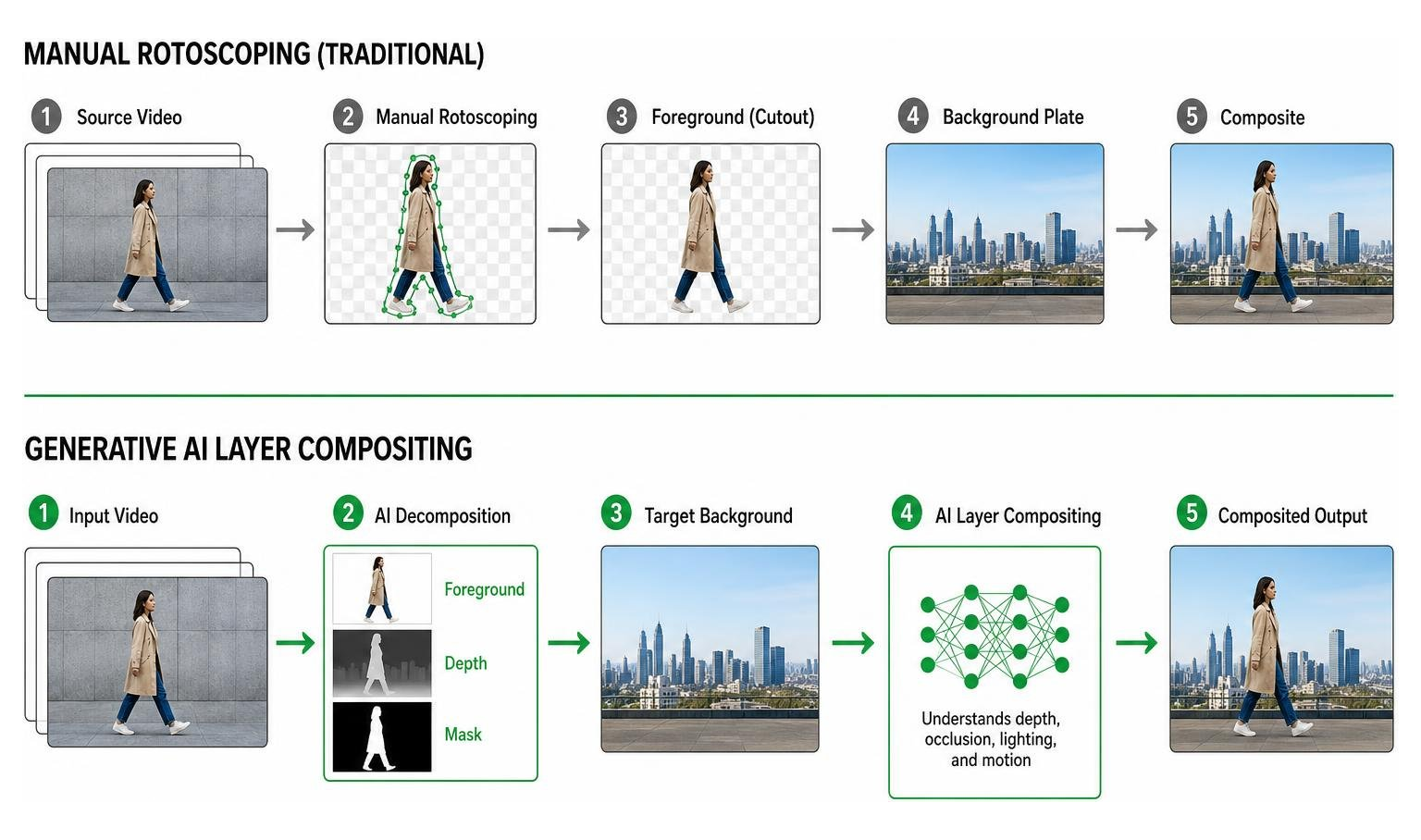
Traditional Compositing vs. Generative Layer Merging
Traditional compositing relies heavily on physical setups and post-production software tricks:
- Green Screen Matting: Requires specialized lighting to key out solid background colors cleanly.
- Manual Rotoscoping: Editors trace subjects frame by frame to separate them from original backgrounds.
- Pixel Blending: Adjusting contrast, saturation, and color wheels manually to match two distinct shots.
Generative layer merging completely alters this approach using background inpainting and visual harmonization. When you remove an element using AI, generative diffusion algorithms synthesize realistic textures to fill the void behind the object.
When inserting a new dynamic subject into a video, the AI evaluates light direction, intensity, and color temperature. Instead of simple visual overlays, it generates contextual shadows, ambient reflections, and edge lighting directly onto the background pixels, resulting in cohesive visual harmony.
Deep Learning Technologies Behind AI Video Layering
The foundation of modern generative video compositing rests on advanced AI architectures:
- Diffusion Transformers (DiT): By replacing standard U-Nets with transformer backbones, DiT models process visual tokens across spatio-temporal latent space, maintaining temporal consistency over time.
- Extended Rotary Position Embedding (ERoPE): Technical breakthroughs highlighted in the GenCompositor Diffusion Transformer Research show how stream-specific position shifts solve spatial collision issues. When combining unaligned foreground and background streams, ERoPE prevents visual distortion and misalignment artifacts.
- Spatio-Temporal Latent Space: Video frames are compressed into dense mathematical vectors where spatial geometry and time-based motion are computed simultaneously, guaranteeing fluid transitions across frames.
Core Features and Technology Architecture

Modern AI composite video applications combine powerful visual editing capabilities with automation. Features like automatic background removal allow creators to swap out real-world settings for virtual backgrounds without setting up expensive physical studios. Motion tracking automatically locks captions, graphical overlays, and callouts to subjects as they navigate across the frame.
Interactive trajectory mapping offers precise creative control. Creators can sketch a line across the video interface, guiding the exact path an inserted dynamic object should follow. Additionally, synchronized auto-captions match spoken audio timing to boost viewer engagement on social media feeds where audio is often muted.
Open-source frameworks like the Open-source GenCompositor Architecture showcase how conditional multi-branch networks decouple visual tasks—maintaining static background pixels via dedicated preservation branches while dynamically injecting animated foreground objects.
How Web, Mobile, and Desktop AI Platforms Function
AI video software operates across three primary environments, each offering distinct advantages:
- Browser-Based Editors: Powered by WebGPU and WebCodecs technology, modern web interfaces like the FrameCompose Browser Editor run hardware-accelerated rendering directly inside your browser. This client-side approach allows scene-by-scene editing and instant playback without waiting for lengthy server queue renders.
- Mobile Applications: Mobile apps rely on cloud GPU processing to handle complex generative tasks while giving users fast, template-driven timeline editing. While subject to smaller screen layouts, mobile environments excel at quick vertical content generation.
- Desktop Workstations: Desktop editing suites offer localized multi-track editing, complex masking controls, keyframing, and professional audio normalization for long-form visual productions.
Identity Preservation and Motion Consistency
A central challenge in AI composite video production is identity drift—where subject features distort or warp across scenes. Generative models overcome this using Gaussian mask inflation and luminance augmentation.
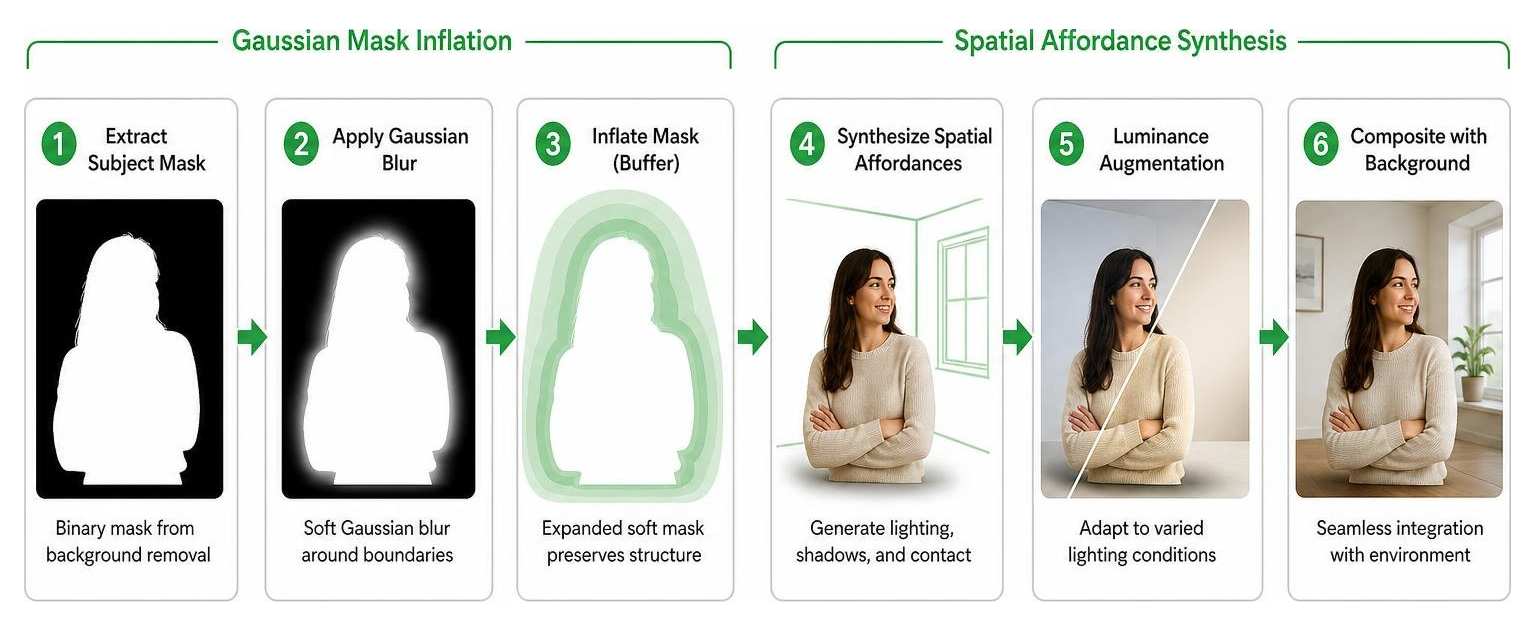
By applying a soft Gaussian blur buffer around extracted subject boundaries, the model retains the subject's exact facial structure and body shape while synthesizing environmental interactions like light blooms and drop shadows. Random luminance adjustments during model training ensure objects adapt naturally to drastic scene lighting shifts without losing visual fidelity.
Recent breakthroughs detailed in the OmniWeaving Unified Reasoning Research show how integrating vision-language models into diffusion backbones enables active reasoning. The model evaluates explicit spatial logic, verifying that foreground subjects maintain consistent identity, temporal movement, and physical affordance across consecutive keyframes.
How to Create AI Composite Videos Without Technical Skills
You do not need an advanced visual effects background to produce dynamic ai composite videos. Modern editing interfaces simplify complex generative tasks into user-friendly web workflows.
By combining template-driven structures with synthetic voiceovers and auto-translated multi-language narration, local businesses and creators can build polished marketing videos in minutes. If you want to integrate digital presenters into your marketing workflows, explore our detailed AI Human Collaboration Guide.
Step-by-Step Guide to Creating AI Composite Videos
Creating your first AI composite video follows a simple, repeatable process:
- Draft Your Script: Start by outlining your visual sequence or use an integrated AI script assistant to generate a structured storyboard.
- Select Your Visual Assets & Avatars: Choose from pre-built digital avatars, upload personal subject imagery, or source relevant video clips.
- Automate Media Matching: Align visual layers to your script segments using smart asset matching.
- Configure Speech & Voiceovers: Select your preferred language, accent, and pitch, or upload pre-recorded audio tracks.
- Refine Captions & Timing: Review automatically generated captions, adjusting text timing and visual placement across the timeline.
If you prefer presenting on camera yourself rather than using digital avatars, review our helpful Tips for Comfortable Video Recording to improve your confidence and delivery.
Agentic and Code-Driven Video Composition Frameworks
For technical creators and marketing agencies needing programmatic content scaling, agentic video production introduces hands-off automation.
Systems like the OpenMontage Open-Source Video System treat AI coding assistants as full production studios. Guided by simple text instructions, autonomous agents perform live research, write scripts, source stock assets, generate text-to-speech audio, and assemble programmatic timelines using code-rendering engines like Remotion or HyperFrames.
This approach allows creators to scale high-volume documentary montages, data-driven explainers, and localized product ads automatically.
Best Practices, Pricing Models, and Overcoming Challenges
Selecting the right compositing environment depends on your technical setup, editing requirements, and output requirements.
| Feature / Metric | Web-Based Editors | Mobile AI Apps | Open-Source Code Frameworks |
|---|---|---|---|
| Primary Advantage | No installation; instant WebGPU timeline editing | High portability; quick template generation | Complete programmatic control; zero API software lock-in |
| Export Resolution | Up to 4K resolution | 720p to 1080p | Unlimited (hardware dependent) |
| Watermark Removal | Included in standard/paid tiers | Requires premium subscriptions | Always watermark-free |
| Technical Requirement | Basic browser access | Mobile OS device | Python, Node.js, and local GPU capabilities |
Best Practices for High-Impact AI Composite Videos
To generate engaging video assets that build brand trust and drive user action, follow these production guidelines:
- Tightly Align Visual and Audio Cues: Ensure background visual cuts align directly with voiceover beats and background audio tracks.
- Maintain Visual Brand Consistency: Use fixed color palettes, custom brand fonts, and consistent visual styling across every composite scene.
- Format for Target Distribution Platforms: Export native 9:16 vertical aspect ratios for social feeds and 16:9 widescreen formats for website landing pages.
- Design for Muted Playback: Add dynamic auto-captions and graphic text callouts to ensure clear communication even when sound is turned off.
Pricing Tiers, Free Version Limitations, and Licensing
Most commercial web and mobile platforms operate on freemium models. Free tiers provide an accessible way to explore features, but often include export limitations:
- Monthly Credit Caps: Free accounts typically limit processing usage to a set credit balance per month.
- Visual Watermarks: Free renders frequently include vendor branding watermarks that require paid tier upgrades to remove.
- Rendering Queues: Free users often experience lower processing priority during peak usage periods.
When producing marketing videos for commercial client campaigns, ensure your platform grants full commercial usage rights and uses legally compliant training datasets to protect your IP rights.
Frequently Asked Questions About AI Video Compositing
What is an AI composite video and how does it differ from traditional video compositing?
An AI composite video combines visual elements—such as video footage, digital avatars, text overlays, and audio—into a unified visual presentation using artificial intelligence. Traditional compositing relies on manual frame-by-frame tracing, physical green screens, and explicit keyframing. AI video compositing automates background removal, light harmonization, optical flow tracking, and object insertion through deep learning models.
Are AI composite video tools free to use, and what are their limitations?
Many tools offer free entry-level plans or browser trials. However, free tiers often include feature limitations such as lower export resolutions (720p/1080p), vendor visual watermarks, constrained monthly rendering credits, and limited commercial usage licensing.
What is the future of AI composite video technology?
The future points toward real-time browser rendering, agentic script-to-video production, and unified Multimodal Diffusion Transformers. Future models will perform active spatial reasoning, allowing users to make complex, non-destructive visual edits using continuous natural language prompts without re-rendering entire video sequences.
Conclusion: Transforming Video Marketing with Generative AI
Generative ai composite videos bridges the gap between ambitious visual storytelling ideas and execution friction. By automating repetitive editing tasks—like background replacements, spatio-temporal tracking, caption alignment, and voice synthesis—businesses can produce high-performing video assets consistently without managing complex traditional film setups.
At Agency Next, we combine conversion-focused website designs, organic search strategies, and next-level video production workflows to turn casual visitors into loyal clients. Explore our practical Marketing Resources to expand your knowledge, learn how to elevate your web presence with our guide on Digital Marketing Website Strategies, or review our full range of growth solutions on our Agency Next Services page today.
Featured Resources
Check Our Latest Resources