
Understanding AI Video Production Tool Categories
Selecting software for ai video production can be overwhelming due to the sheer volume of options available. To make an informed decision, it helps to categorize tools based on where they sit in your production pipeline.
Understanding the distinction between these categories prevents you from paying for specialized features you don't need or attempting to build structured marketing assets inside a tool designed purely for visual effects.
| Tool Category | Primary Mechanism | Key Asset Inputs | Primary Output | Typical Learning Curve |
|---|---|---|---|---|
| AI Video Generators | Diffusion models & neural rendering | Text prompts, reference images, motion paths | Standalone raw video clips (4s to 30s) | Moderate (Requires prompt engineering) |
| AI Video Editors | Computer vision, NLP & audio analysis | Long-form video, audio tracks, script text | Polished, captioned, timeline-edited video files | Low (Text-document style interface) |
| AI Creation Suites | Multimodal orchestration & digital avatars | Text scripts, brand guidelines, audio files | Complete structured videos with voiceover and captions | Very Low (Drag-and-drop web interfaces) |
Generative AI Video Production Engines
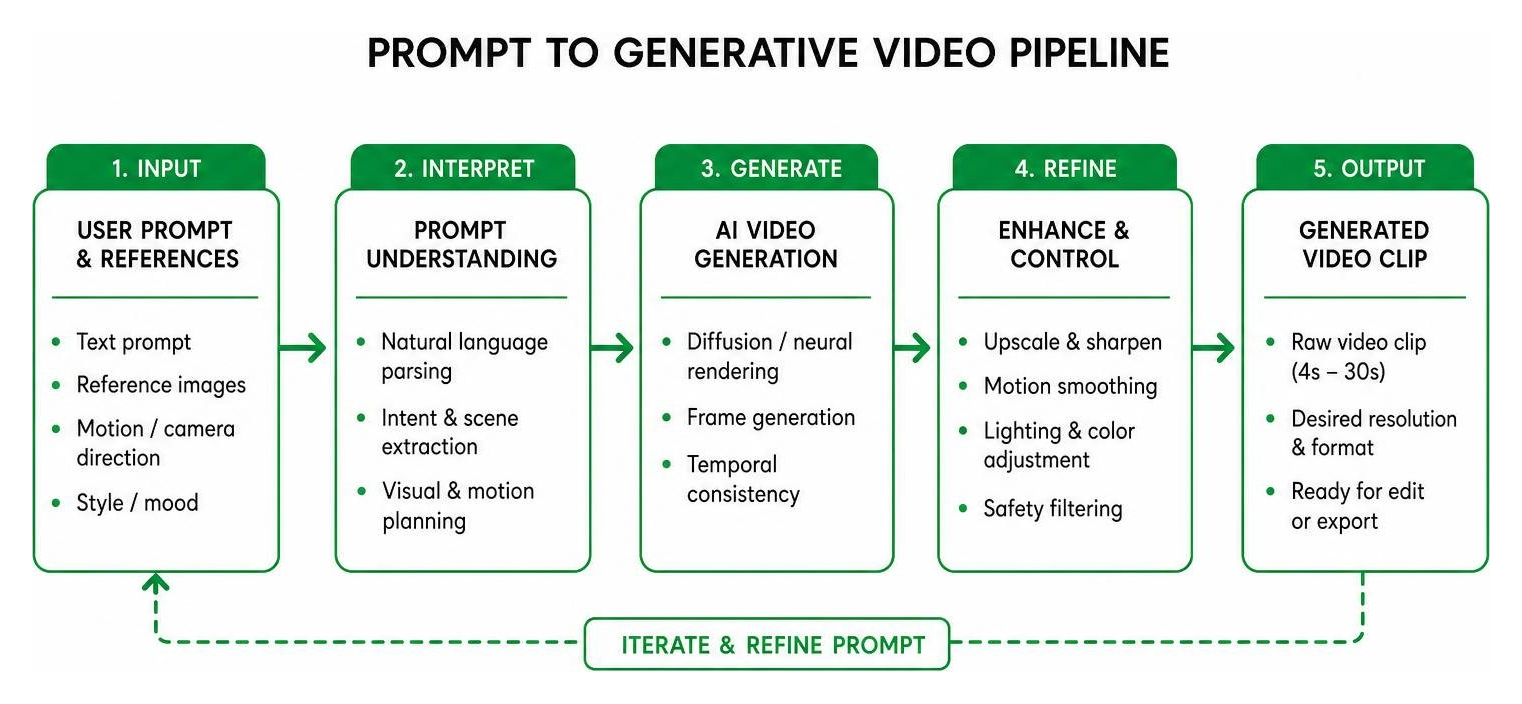
Generative AI video engines build entirely new visual footage from scratch. Using text-to-video or image-to-video diffusion architectures, these models allow creators to render visuals unconstrained by real-world physics or production constraints. Want a video of an astronaut running a marathon on the moon? Generative models deliver that clip in moments without requiring space program budgets or risking life and limb.
Flagship generative systems process multi-modal inputs, combining textual instructions with reference image sets and specified camera movements. For instance, Google Veo 3.1 supports an "ingredients-to-video" workflow, enabling creators to tightly ground generation using multiple image references alongside descriptive text. Similarly, advanced features like Runway's Act Two capture human actor performances on camera and map full emotional, facial, and body dynamics directly onto generated characters. Meanwhile, platforms like Higgsfield AI — AI-native creative suite allow creators to leverage multi-reference generation processing up to 50 references in a single pass to maintain structural consistency across generated clips.
The primary challenge with generative tools lies in visual consistency and motion control. While models excel at generating dramatic action or stylized B-roll, maintaining precise character identity across multiple scenes requires structured prompting strategies or keyframe grounding.
AI Video Editors and Script-Based Software
AI video editors focus on accelerating post-production workflows for pre-existing media. Instead of forcing you to cut video manually on a visual timeline, script-based editors use Natural Language Processing (NLP) to transcribe spoken dialogue into text. Editing the video becomes as simple as editing a text document: deleting a sentence from the written transcript automatically clips out the corresponding video and audio segment.
Beyond script editing, AI post-production tools automate several tedious editing tasks:
- Silence and Filler-Word Removal: Automatically identifying and removing awkward pauses, "ums," and "ahs."
- Visual Refinement: Applying low-light enhancement, automated noise reduction, visual stabilization, and frame interpolation.
- Smart Formatting: Re-framing horizontal 16:9 media into vertical 9:16 aspect ratios while tracking the speaker's face.
- Background Erasure: Separating foreground subjects from backgrounds without using physical green screens.
For teams managing high volumes of recorded footage—such as podcasts, client interviews, or corporate webinars—AI editors reduce editing time from hours to minutes.
All-in-One AI Video Creation Suites
AI video creation suites serve as complete turnkey platforms. These applications synthesize digital presenter avatars, synthetic text-to-speech narration, graphic templates, auto-generated subtitles, and background music into a single workflow.
Rather than capturing camera footage or generating complex prompt sequences, users simply paste a text script into the application. The creation suite assigns a photorealistic or animated digital presenter, generates natural lip-synced narration across dozens of languages, and automatically pairs scenes with relevant B-roll clips from deep stock footage libraries. Platforms like InVideo AI tap into stock libraries containing over 16 million clips to instantly construct narrative explainers.
These suites are ideal for producing corporate communications, HR onboarding modules, educational presentations, and scaled performance marketing assets where clear narration and visual structure matter more than high-concept cinematic visuals.
Key Criteria for Evaluating Commercial AI Video Software
Not all AI video tools are built for business use. Evaluating platforms requires looking beyond promotional product demos to inspect export specifications, workflow velocity, legal rights, and credit mechanics.

Checkpoints for Evaluating Commercial AI Video Software
- Resolution and Export Flexibility: Does the tool output native 1080p or 4K, or does it rely on low-resolution upscaling?
- Commercial IP Indemnification: Are the underlying models trained on ethically sourced or fully licensed media, and does the provider shield your business legally?
- Workflow Speed and Previewing: Is there a low-cost or low-resolution draft mode to test concepts before spending render credits?
- Audio and Lip-Sync Integration: Does the software handle parallel audio generation, voice synthesis, and multi-language lip synchronization?
- Aspect Ratio Control: Can assets be rendered natively in 16:9, 9:16, and 1:1 without distorting composition?
Output Quality and Control in AI Video Production
Visual rendering quality has advanced significantly. High-end tools no longer yield fluid, morphing artifacts; modern models utilize advanced physics reasoning. Systems like the Kling 3.0 Omni AI Video Generator | Online Studio leverage 3D Spacetime Joint Attention and Chain-of-Thought physics reasoning to simulate real-world gravity, inertia, structural collisions, and fluid mechanics accurately.
Controllability is just as important as visual realism. To evaluate a generative model's artistic control, test its handling of explicit camera directions (such as orbital pans, aerial tracking shots, or crane lifts) and frame rates. Systems offering native 1080p export, high dynamic range (HDR) profiles, or linear EXR frame sequences integrate directly into professional video software applications like After Effects or DaVinci Resolve.
Furthermore, developer-focused workflows like the OpenMontage Agentic Framework allow creative teams to programmatically manage video rendering via code, building open asset pipelines that bypass proprietary software limits entirely.
Free Tier Limitations and Commercial Licensing
Testing tools on free plans is essential, but free tiers often hide commercial limits in their terms of service.
Many popular platforms offer non-refreshing starter credits upon registration—for instance, providing 125 single-use credits that yield only 2 or 3 short sample clips. Other platforms permit unlimited daily generations but cap resolution at 720p or enforce prominent visual watermarks.
More critically, commercial licensing varies widely across tiers:
- Non-Commercial Restrictions: Output created under free plans is frequently restricted to personal evaluation. Using these clips in paid client work or commercial marketing campaigns can violate platform terms.
- Copyright and IP Protection: Enterprise-grade platforms mitigate legal liability by training models exclusively on public domain assets or licensed stock libraries. Adobe Firefly, for instance, trains on Adobe Stock and public domain content, offering formal contractual IP indemnification for enterprise subscribers.
- Credit Decay: Be mindful of subscription models where unused generation credits expire at the end of every billing cycle rather than rolling over.
Matching Software to Specific Video Production Use Cases
The ideal software choice depends heavily on your primary distribution channels and production objectives.

Social Media and Short-Form Content
Short-form video published to channels like TikTok, Instagram Reels, and YouTube Shorts demands speed, vertical framing, and high visual hook retention.
For these platforms, prioritize software that supports:
- Direct 9:16 Aspect Ratios: Generating natively in vertical formats ensures your subject remains cleanly composed without requiring dynamic cropping.
- Automated Captions: Over 80% of short-form social media video is consumed on mute. Look for tools offering dynamic, word-timed subtitle overlays with customizable styling.
- Rapid Iteration: Speed is critical. Tools that support rapid draft modes—such as fast low-resolution previews—allow you to test creative concepts quickly before committing render credits.
Combining rapid generator tools (to build background visual hooks) with fast timeline editors (to overlay dialogue, music, and captions) creates an efficient, low-cost social production pipeline.
Corporate Training and Multilingual Localization
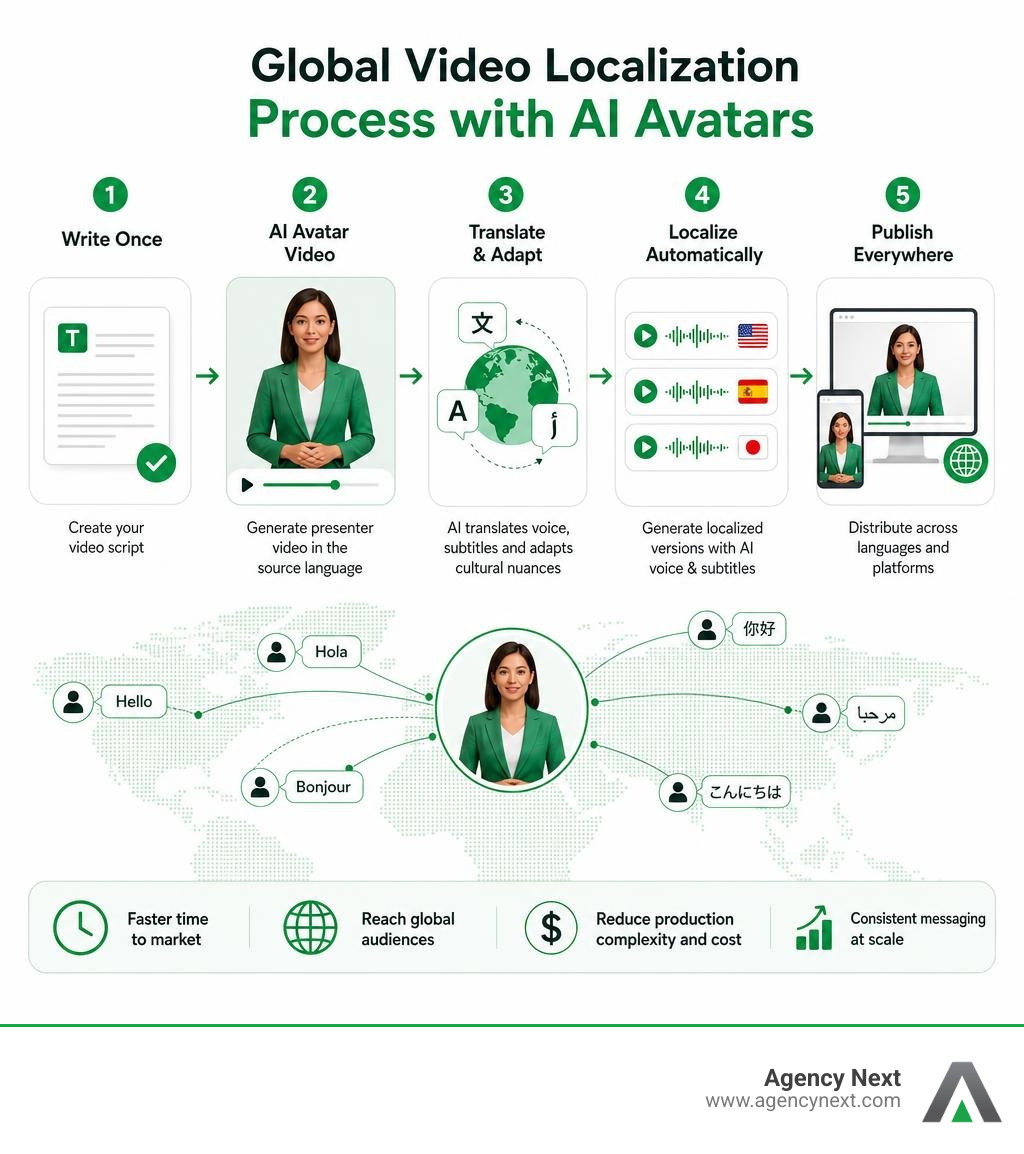
For internal corporate communications, HR onboarding, and customer training, human-presenter avatars and synthetic voice tools deliver immense production savings.
Producing live-action training videos traditionally requires hiring presenters, booking studio space, and coordinating localization crews across multiple target markets. Synthetic creation suites simplify this process down to script entry and asset compilation:
Real-world case studies highlight the operational impact of synthetic video:
- Workday used HeyGen to cut video localization timelines from weeks to minutes across 10-15 target languages.
- Würth Group reported an 80% reduction in translation costs by localizing training materials with AI presenters.
- Komatsu achieved training completion rates near 90% after transitioning static documentation into presenter-led synthetic training videos.
These tools support voice cloning and multi-language lip-syncing across dozens of dialects with high caption precision. This capability allows businesses to deploy personalized, global training campaigns rapidly while maintaining low production costs.
Pre-Visualization and Open-Source Workflows
For agencies, filmmakers, and digital studios, ai video production provides a powerful way to visualize concepts before pitching clients or launching costly live-action shoots. Shot-by-shot storyboarding interfaces allow creative directors to specify scene breakdowns, lighting setups, framing angles, and wardrobe continuity across sequential frames.
For teams seeking deep customization, open-source architectures offer absolute creative control without subscription fees. Frameworks such as the OpenMontage Open-Source Architecture allow developers and technical creators to orchestrate video production using local AI models (such as Wan 2.1 or Hunyuan) paired with programmatic video tools like Remotion and FFmpeg.
These developer workflows leverage AI coding assistants to handle scene planning, script research, asset generation, and rendering automation. They can also assemble video sequences by semantically retrieving public domain media from open archives like Archive.org, NASA, and Wikimedia Commons.
Integrating AI Tools into Existing Production Workflows
Integrating AI into your production setup does not mean replacing your creative staff or throwing out existing tools. The most effective approach relies on dynamic human-led oversight supported by AI speed. Discover how our team approaches balancing technology with hands-on creative direction by reading our guide to AI & Human Collaboration.

Scripting and Asset Pre-Production
Before spending credits in generative video software, complete your planning, scripting, and visual asset preparation.
- Break Down Scripts into Simple Shots: Complex prompts containing multiple simultaneous actions often cause rendering visual bugs. Splitting prompts into concise, single-action clips ensures cleaner outputs.
- Gather High-Quality Reference Inputs: Generative engines perform best when grounded by visual context. Feed your tools clear image sets, color palettes, and stylistic references to maintain brand identity.
- Draft Prompts Offline: Draft and refine your prompt text in standard documents before pasting them into credit-consuming generation interfaces.
Post-Production Editing and Final Output
Once raw AI assets or synthetic scenes are rendered, bring them into standard video editors or consolidated web timelines for final polish.
- Smooth Out Edits with Generative Motion: Use AI generative extend tools to stretch raw video clips by several frames, creating smoother edit points without needing extra shoots.
- Script-Based Audio Polish: Process voiceover tracks through AI dialogue polish tools to remove ambient noise and equalize speaker volume automatically.
- Quality Control Gates: Run every rendered asset through a manual quality checklist. Inspect human hands, background details, text overlays, and audio sync to catch morphing artifacts or misaligned dialogue before publishing.
Frequently Asked Questions About Video AI
What is the primary difference between AI video generators and AI video editors?
AI video generators build completely new visual media from text prompts, reference images, or performance capture. AI video editors process pre-existing recorded media—using automated tools to trim dialogue, remove background noise, generate captions, and extract short social clips.
Can free AI video generator output be legally used for commercial projects?
It depends entirely on the platform's terms of service. Software like CapCut's desktop app allows commercial use on free exports, whereas platforms like InVideo restrict free exports exclusively to non-commercial evaluation. Always review platform licensing terms before using free assets for commercial client work.
How do teams integrate AI video tools without sacrificing output quality?
Maintain a human-in-the-loop workflow. Use AI to handle fast concepting, draft B-roll generation, transcription, and translation, but keep human editors in charge of creative direction, script editing, visual quality control, and final publishing decisions.
Streamlining Your Production Strategy
Evaluating ai video production tools comes down to matching technology to your business objectives. Whether you need fast social media visuals, synthetic presentation videos, or automated localization across global languages, selecting software that aligns with your workflow, legal requirements, and output quality standards is essential.
At Agency Next, we help businesses navigate modern digital technology to build high-converting websites, execute targeted local marketing, and deploy effective AI video strategies. Explore how our team can transform your digital strategy by visiting our suite of Services, or get in touch with our team today to discuss your next video production project!
Featured Resources
Check Our Latest Resources